

If you've built Hooks on Xahau, you've been here: staring at a raw HookState entry like 5852504C57696E and trying to figure out what it actually means.
Is it a UInt32? A VarString? A Timestamp? A ledger index? Big-endian or little-endian?
You either write a throwaway script, crack open a hex calculator, or just guess. None of these are great when you're in the middle of debugging a Hook at 2am.
That's exactly why we built the Hook State Converter: https://xahau.xrplwin.com/tools/hook/abi-conversion-helper
But before we get into the tool, let's talk about why HookState data is so hard to read in the first place — because understanding the problem makes the solution a lot more useful.
Why HookState data is hard to read
Xahau Hooks are small programs that run directly on the ledger. They can read and write persistent state using a key-value store called HookState. Each entry has a 32-byte key and an arbitrary-length value, both stored as raw binary data on the ledger.
That last part is the catch: raw binary data
Unlike a database where you define a schema upfront and the engine enforces types, HookState has no built-in type system. A Hook author decides how to encode data — as a little-endian UInt32, as an XFL float, as a packed struct of multiple fields — and that decision lives only in the Hook's source code. The ledger just stores bytes.
When you look at an account's HookState on an explorer, you see something like this:
Key:   637373746F6D65725F6163636F756E74000000000000000000000000000000000000
Value: 05A528BCFA2189C8E2E7813775ED71B2C4BE349F
What does the key mean? What type is the value? Is it an AccountID? A hash? A packed amount and timestamp? There is no metadata attached to the entry. The ledger doesn't know and doesn't care — it just stores and retrieves bytes on demand.
This creates a real problem for anyone who isn't the original Hook author:
Auditors trying to verify what state a Hook is reading and writing Developers debugging why a Hook behaved unexpectedly Integration builders trying to read HookState from an external app Explorer users who just want to understand what they're looking at. Even if you are the original author, coming back to a Hook months later and trying to remember your own encoding scheme is painful. And if the Hook is open source but the ABI schema isn't documented anywhere, you're left reading C source code and mentally simulating byte offsets.
The encoding rabbit hole
To illustrate how quickly this gets complicated, consider a simple HookState key that encodes a string like customer_account padded to 32 bytes:
637573746F6D65725F6163636F756E740000000000000000000000000000000000000000To decode this manually you would:
- Split the hex into byte pairs: 63 75 73 74 6F 6D 65 72 5F 61 63 63 ...
- Convert each byte from hex to ASCII: c u s t o m e r _ a c c o u n t \0 \0 ...
- Recognize it as a null-padded ASCII string
- Figure out where the meaningful content ends and the padding begins
That's a relatively simple case. Now imagine the value is a packed struct: 05A528BCFA2189C8E2E7813775ED71B2C4BE349F
Is that 20 bytes? Yes. So it could be a Hash160 or an AccountID. Both are 20 bytes. How do you know which one? You go read the Hook source code. If you're lucky it's commented. Usually it isn't.
Now multiply this across a Hook that stores 10 or 15 different state keys, each with a different encoding scheme, and you start to understand why debugging HookState is one of the more tedious parts of Xahau development.
What the Hook State Converter does
The Hook ABI Conversion Helper is our answer to this problem. It gives you an interactive UI to paste hex, decode it visually, and export a reusable ABI schema — all without writing a single line of code.
The tool accepts three inputs:
HookState key + value pairs — the most common case HookParameter pairs — named parameters passed into Hook invocations Invoke blobs — raw binary payloads attached to Invoke transactions.
Paste hex. Get answers.
Paste your hex into the input fields and the UI immediately does three things:
- Splits the hex into individual byte buttons
- Marks the key as Solved or Unsolved depending on whether it matches a known schema
- Runs an automatic scan and populates suggestions
Each byte is a clickable button. You select bytes by clicking — selecting byte 5 means you've selected bytes 1 through 5 as a single segment. The UI updates in real time to show you every ABI type that fits that exact byte length.
Smart suggestions first
You don't need to know the type upfront. The Suggest button scans your hex across all supported ABI types simultaneously and surfaces the most plausible matches as clickable buttons — each showing the type name and the decoded value inline.

For example, paste 5852504C57696E and you'll instantly see:
VarString XRPLWin
UInt64 32075751449710680
Blob 5852504C57696E
One click to confirm. The tool locks that interpretation and moves on to the remaining bytes. The scan is smart about filtering noise — it suppresses leading null bytes from Null suggestions since those are almost always padding, surfaces VarString matches only when the bytes decode to printable UTF-8, and collapses partial string matches so you see the longest valid string, not every sub-sequence.
Manual byte picking for complex states
If autoscan doesn't nail it, or you're working with a tightly packed multi-field state, the byte picker gives you full control.
Click any byte button to select from byte 1 up to that point. The result panel shows every ABI type that fits that exact byte length — UInt16, UInt16 (BE),
Int16
, Timestamp, LedgerIndex — each with the decoded value shown.
Select the type that matches your Hook's logic. The tool locks that segment, advances to the remaining bytes, and a new engine appears for the next segment. You repeat the process until every byte is accounted for.
This chained engine approach means you can decode a 32-byte key that encodes, say, a 4-byte UInt32 flag, a 20-byte AccountID, and 8 bytes of NULL padding — step by step, segment by segment, without losing track of where you are in the buffer.
20+ ABI types supported
- Integers: UInt8/16/32/64, Int8/16/32/64 (LE & BE)
- Floats: XFL (LE & BE)
- Amounts: Amount, NativeAmount, IOUAmount
- Strings: VarString
- Hashes: Hash128/160/256/512
- Identity: AccountID
- Ledger: Timestamp, LedgerIndex
- Raw: Blob, Null
Both little-endian and big-endian variants are available for integer and float types, since Hooks developers sometimes store values in BE when interfacing with external systems.
Per-segment options
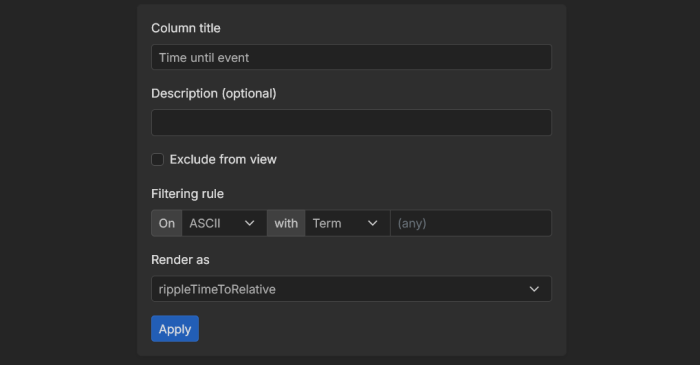
Once you select a type, a small options panel appears for that segment. You can:
Rename the label — give it a meaningful name like customer_account instead of VarString
Add a description — document what this field represents.
Set a filtering rule — define a literal pattern or regex that this segment must match for the decoding to be valid. Useful for sentinel bytes or magic values that identify the schema version.
Exclude from view — mark padding or fixed bytes as hidden so they don't clutter the final table.
Set a renderer — control how the decoded value is displayed, for example there are various Timestamp renderers.
Hit Apply and the finalized table updates immediately.
Export the ABI schema
Once every byte is accounted for, the tool renders a full breakdown table with raw and rendered values side by side, and below it — the Segment ABI as JSON.
A 32-byte key encoding the string customer_account produces:
[
  {
    "type": "VarString",
    "byteLength": 32,
    "label": "Customer Account"
  }
]
This JSON is the reusable schema and it's part of the Hook manifest format that XRPLWin uses internally. When a Hook manifest is registered with the explorer, it includes ABI definitions like this one — and XRPLWin uses them to automatically decode and display HookState entries in a human-readable way for anyone viewing that Hook on the explorer. You won't need to copy or paste anything manually — a dedicated projection builder UI is available that will use this conversion helper under the hood to generate manifest segments interactively.